Court-Side Live Production

Hoop Culture Scoreboard System

A professional broadcast scoreboard powering stadium venues, OBS overlays, and live stream graphics — with three deployment modes: fully offline local, OnRender full-stack cloud, and Vercel + Firebase serverless cloud.

Start Operator Console View Overlay Screens
Triple-Mode Architecture

Ecosystem Workflow

LOCAL TABLET
● CONTROLLER100%
GAME CLOCK
12:34
Q4 - PERIOD 2
HOME +
GUEST -

Scoreboard Controller

TABLET / PHONE ON LOCAL WIFI

DATA SIGNAL
COMMANDS
LOCAL SERVER
> LOCAL SERVER RUNNING
IP ADDRESS: 192.168.1.10
STATUS: CONNECTED
SCOREBOARD ACTIVE
> waiting for commands...

Local Laptop Server

IP ADDRESS: 192.168.1.10

DATA FEED
UPDATES
TV / BROADCAST
🔴 LIVE SCOREBOARD FEED
BEARS24
08:15
LIONS17

Live Score Overlay

HDMI TV & OBS LIVE STREAM

Beta Feature

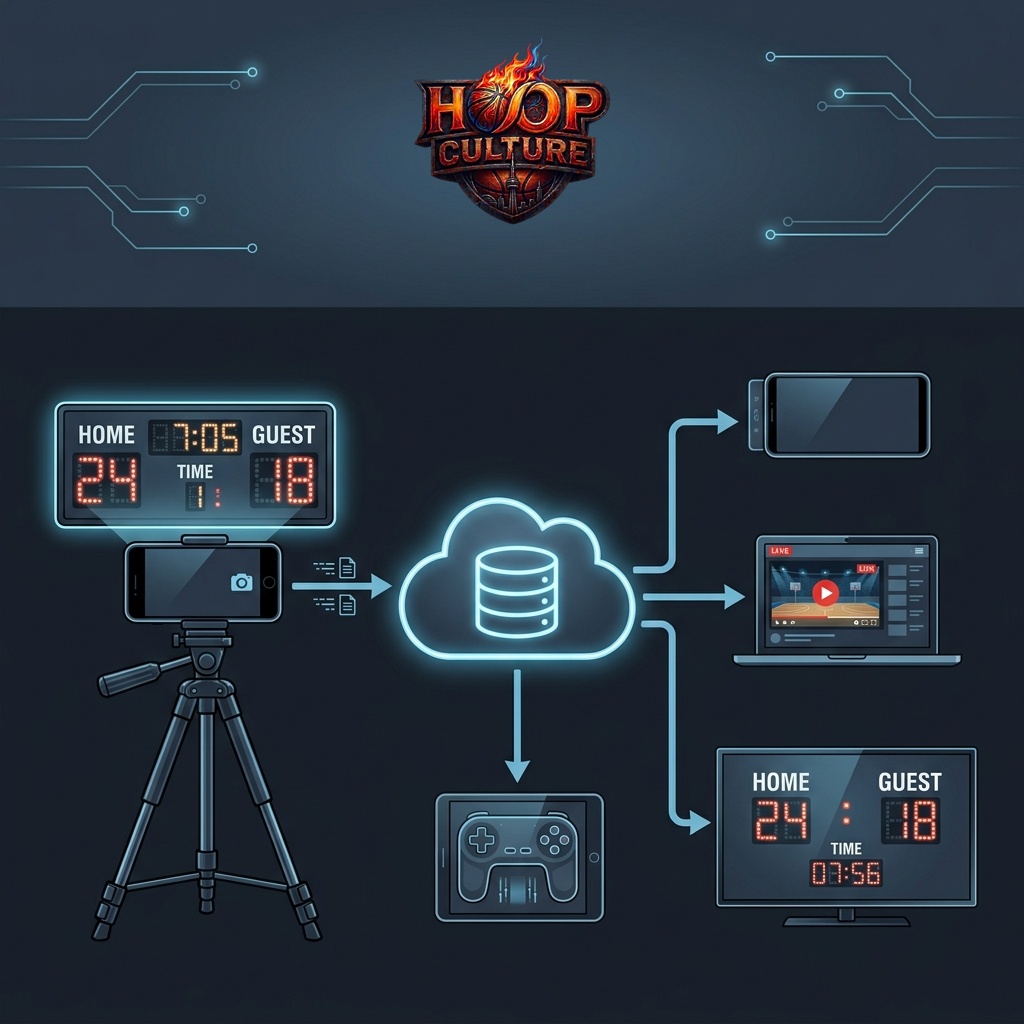
Mobile Browser OCR Scoreboard Sync

Enhance your game day production by pointing a smartphone camera or webcam at a physical gymnasium scoreboard. Our live WebAssembly-based scanner performs OCR locally in the phone's browser, syncing scores and clocks instantly with overlays and displays without requiring local laptops or video streaming.
🚀 Launch Mobile Scanner
Mobile Browser OCR Scoreboard Sync Workflow
Interface Hub

Ecosystem Screens

📱

Scoreboard Operator

The primary game controller layout. Change team names, manage score adjustments, timeouts, fouls, and authoritative clocks.

Launch Panel ➔
📺

Stadium Display 1

Clean, high-visibility layout styled specifically to project onto court monitors, venue TV screens, or wall projectors.

Open Display ➔
🖥️

Stadium Display 2

Alternate stadium projector scoreboard styling offering a variation in visual layout and branding colors.

Open Display 2 ➔
⏱️

Shot Clock Operator

Handheld responsive panel design specifically built for a dedicated shot-clock official operating from a smartphone or tablet.

Launch Controller ➔
🚨

Shot Clock Display

Visual-only shot clock numbers with red backlight indicators to mount behind the backboard in the arena.

Open Display ➔
🎥

OBS Fullscreen Overlay

Premium full-width scoreboard overlay template with glassmorphism and real-time animation for OBS Studio.

Launch Overlay ➔
🔥

ESPN / NBA Scorebug

A floating graphics bug matching the professional NBA broadcast look, positioned at the bottom right of the stream.

Launch Bug ➔
🏀

NBA Scorebug 2

Alternate layout configuration for the ESPN/NBA floating stream bugs, customized for specific game stats overlays.

Launch Bug 2 ➔

100% Offline Capable

Operates over a local Wi-Fi hotspot network — no internet or cellular data required during active game play. Full scoreboard, overlays, and shot clock all work offline.

Dual-Cloud Redundancy

Two independent cloud deployments — Vercel + Firebase (serverless) and OnRender (full-stack). If one goes down, switch to the other without missing a beat.

Zero Clock Drift

Clocks tick authoritatively — on the server in Node.js mode, and in the operator's browser in Vercel/Firebase mode — preventing drift across all connected displays.

Firebase Realtime Sync

In Vercel mode, all score changes, clock ticks, and buzzer events are synced instantly through Google Firebase — no backend server required.

Auto Brand Colors

Uploading any team logo automatically extracts its dominant color, updating scoreboard styling across all screens instantly.

Documentation Hub

How To Use The Scoreboard

Detailed setup instructions for game operators, stream producers, and crew members. Learn how to configure and run the digital scoreboard system.

🎮

Manual Scorekeeper Guide

Learn how to change team names, manage score adjustments, timeouts, fouls, and handle clock controls.

Read Guide ➔
🤖

AI Camera Sync Guide

Detailed guide on how to configure a smartphone or USB webcam with ScoreSight to extract scores and clocks automatically.

Read AI Guide ➔
🎥

OBS Studio Stream Setup

Learn how to configure lower-third scorebars and fullscreen scoreboard graphics directly into OBS Studio.

View Setup ➔
Loading manual scorekeeper guide...
Loading AI scoreboard camera sync guide...
Loading OBS stream setup guide...